The Problem: The Mystery of this
In JavaScript, the value of this depends on how a function is called.
Sometimes, you want to control what this refers to. This is where call,
apply, and bind come in. Think of them as tools to "steer" the this
keyword explicitly.
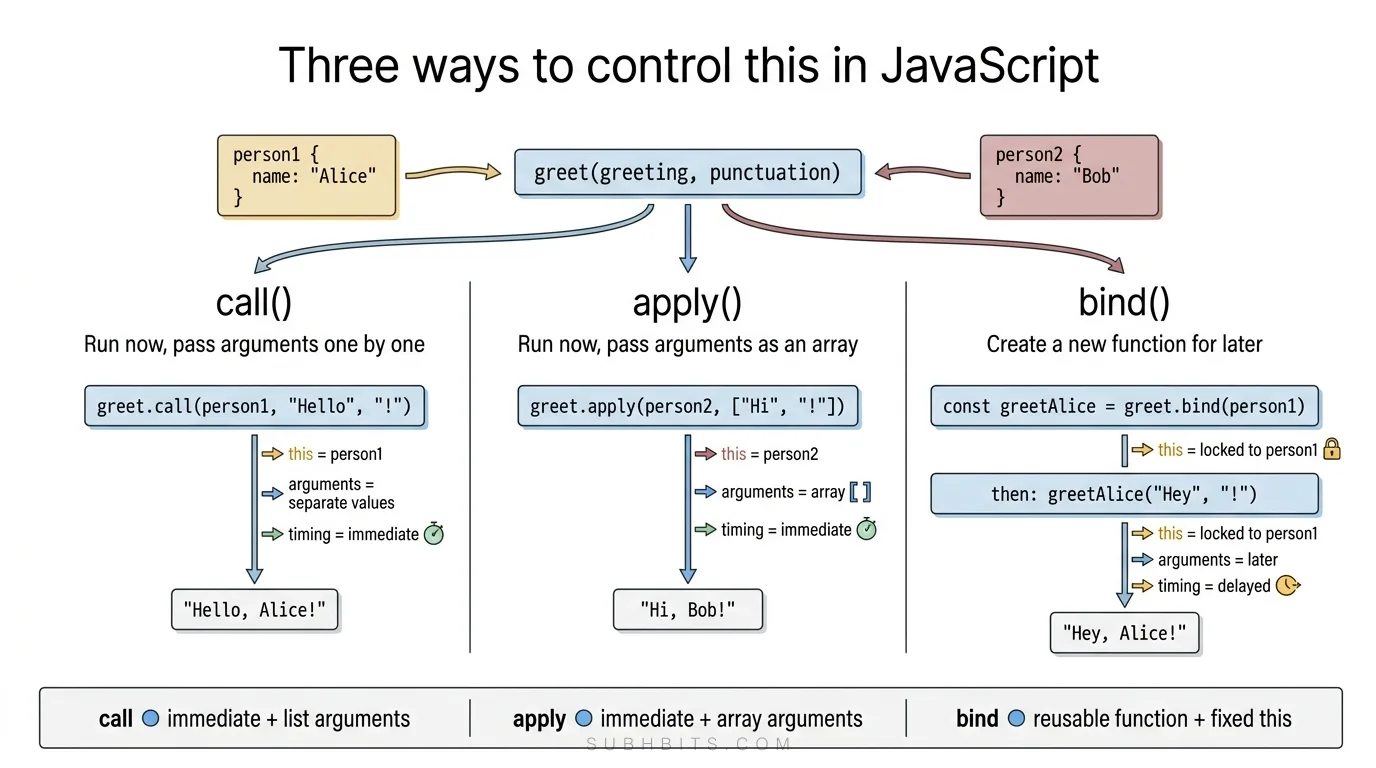
The Analogy: A Car (Function) and Its Driver (this)
Imagine functions as cars. Normally, the driver (this) is determined by who starts the car (calls the function). But what if you want to loan your car to a friend (a different object)? call, apply, and bind let you do this:
- call: "Drive my car now, and here’s a list of instructions (arguments)."
- apply: "Drive my car now, and here’s a box of instructions (array)."
- bind: "Here’s a clone of my car pre-configured for your use. Drive it whenever you want."
Interactive Examples
1. call(): Immediate Execution with Arguments
call() invokes a function immediately, specifying this and passing arguments
individually.
Without call, apply, or bind, the this context will be either:
undefined(in strict mode) or- The global object (in non-strict mode)
// Define objects and function
const person1 = { name: "Alice" };
const person2 = { name: "Bob" };

function greet(greeting, punctuation) {
  console.log("this value:", this);
  console.log(`${greeting}, ${this.name}${punctuation}`);
}
// Call without setting 'this' context
console.log("Calling without call/apply/bind:");
greet("Hi", "!"); // Will throw error or show undefined for this.name
Using call() to set 'this' context
// Define objects and a function
const person1 = { name: "Alice" };
const person2 = { name: "Bob" };

function greet(greeting, punctuation) {
  console.log(`${greeting}, ${this.name}${punctuation}`);
}

// Use call() to set 'this' to person1
greet.call(person1, "Hello", "!"); // Output: "Hello, Alice!"
2. apply(): Immediate Execution with an Array
apply() works like call(), but accepts arguments as an array.
const car = { brand: "Tesla" };

function describeCar(color, year) {
  console.log(`This ${color} ${this.brand} was made in ${year}.`);
}

// Using apply() with an array of arguments
describeCar.apply(car, ["red", 2023]); // Output: "This red Tesla was made in 2023."
3. bind(): Create a Reusable Function with Preset this
bind() returns a new function with a fixed this value. You can call it
later!
const dog = { name: "Rex" };

function bark(sound) {
  console.log(`${this.name} says ${sound}!`);
}
How Each Method Works?
call(): Borrow a Function Immediately
The call() method in JavaScript is used to invoke a function immediately with
a specified this value and individual arguments. Here's a detailed
explanation:
- Purpose: The primary purpose of
call()is to execute a function with a specificthiscontext. This is particularly useful when you want to borrow a method from one object and use it on another object. - Syntax: The syntax for using
call()isfunc.call(thisArg, arg1, arg2, ...). Here,funcis the function you want to invoke,thisArgis the value you want to use asthisinside the function, andarg1, arg2, ...are the individual arguments you want to pass to the function. - How it Works: When you use
call(), the function is executed immediately. Thethisvalue inside the function is set to thethisArgyou provide. The remaining arguments are passed to the function as individual parameters.
Example:
const person1 = { name: "Alice" };
const person2 = { name: "Bob" };

function greet(greeting, punctuation) {
  console.log(`${greeting}, ${this.name}${punctuation}`);
}

// Use greet() with person1 as 'this'
greet.call(person1, "Hello", "!"); // "Hello, Alice!"
// Use greet() with person2 as 'this'
greet.call(person2, "Hey", "!!"); // "Hey, Bob!!"Analogy: You’re handing over your car keys (this) and a list of directions
(arguments) to someone else. They drive the car right away.
apply(): Borrow a Function with an Array of Arguments
- What it does: Similar to
call, but accepts arguments as an array. - Syntax:
func.apply(thisArg, [arg1, arg2, ...])
Example:
const numbers = [5, 1, 4, 2, 3];
// Use Math.max with 'null' for 'this' (it doesn't matter here)
const max = Math.max.apply(null, numbers); // 5
Why Use It?: Useful when working with functions that expect a list of
arguments, but you have an array (e.g., Math.max).
Analogy: You give a box (array) of items instead of handing them one by one.
bind(): Create a Reusable Function with Fixed this
- What it does: Returns a new function with a fixed
thisand optionally preset arguments. - Syntax:
const boundFunc = func.bind(thisArg, arg1, arg2, ...)
Example:
const person = { name: "Charlie" };

function logName() {
  console.log(this.name);
}

// Create a new function where 'this' is always 'person'
const boundLog = logName.bind(person);
boundLog(); // "Charlie"
Partial Application: Partial application with bind allows you to create a new function with some preset arguments. This is helpful because it lets you reuse functions with specific configurations without rewriting them. For example, if you have a function that takes multiple arguments, you can use bind to fix some of those arguments, creating a simpler function that requires fewer inputs when called.
If you don't use bind, you would need to manually create a wrapper function to achieve the same effect. Here's an equivalent approach without using bind:
Without bind (Manual Partial Application)
function multiply(a, b) {
  return a * b;
}
// Manually creating a partially applied function
function double(b) {
  return multiply(2, b);
}
console.log(double(5)); // 10 (2 * 5)
This achieves the same result as using bind, but requires manually defining a new function.
If you don't use bind, you would need to manually create a wrapper function to achieve the same effect. Here's an equivalent approach without using bind:
Without bind (Manual Partial Application)
function multiply(a, b) {
  return a * b;
}
// Manually creating a partially applied function
function double(b) {
  return multiply(2, b);
}

console.log(double(5)); // 10 (2 * 5)
This achieves the same result as using bind, but requires manually defining a new function.
Using Closures (Partial Application)
function multiply(a, b) {
  return a * b;
}

// Using a closure to create a partially applied function
function partialMultiply(a) {
  return function (b) {
    return multiply(a, b);
  };
}

const double = partialMultiply(2);

console.log(double(5)); // Output: 10 (2 * 5)
With bind (Using Partial Application)
function multiply(a, b) {
  return a * b;
}
// Pre-set the first argument as 2
const double = multiply.bind(null, 2);
console.log(double(5)); // 10 (2 * 5)
Comparison of Methods
| Method | Description |
|---|---|
| Without bind | You manually create a new function |
| With bind | Bind pre-sets the first argument, returning a new function |
| With Closures | A function returns another function that remembers the first argument (a) |
4. Key Differences Summary
| Method | Invokes Immediately? | Arguments Format | Returns |
|---|---|---|---|
call() | Yes | Individual (arg1, ...) | Result of the function |
apply() | Yes | Array ([args]) | Result of the function |
bind() | No | Individual (arg1, ...) | A new bound function |
Mnemonic:
- Call → Comma-separated args.
- Apply → Array of args.
- Bind → Bind now, call later.
Corner Cases and Gotchas
Have you ever wondered about those tricky situations and unexpected surprises that can pop up when using these methods?
A. call and apply
-
null/undefinedasthisArg:- In non-strict mode,
call/applyreplacenull/undefinedwith the global object (e.g.,windowin browsers). - In strict mode,
thisremainsnull/undefined.
function test() { console.log(this); } test.call(null); // In non-strict: Window; strict: null - In non-strict mode,
-
Primitive Values as
thisArg:- Primitives (e.g.,
5,"hello") are wrapped into their object counterparts (Number,String).
function logType() { console.log(typeof this); } logType.call(5); // "object" (Number(5)) - Primitives (e.g.,
-
Arrow Functions Ignore
call/apply:- Arrow functions inherit
thisfrom their lexical scope. Usingcall/applywon’t override it.
const obj = { x: 10 }; const arrow = () => console.log(this.x); arrow.call(obj); // undefined (inherits global `this`) - Arrow functions inherit
B. bind
-
Bound
thisCannot Be Overridden:- Once bound,
call/applycannot changethisfor the bound function.
const boundFunc = function () { console.log(this.id); }.bind({ id: 1 }); boundFunc.call({ id: 2 }); // 1 (not 2!) - Once bound,
-
Partial Application with bind:
- When you use bind to partially apply a function, the arguments you specify during binding are added before any arguments you pass when you later call the function.
function multiply(a, b) { return a * b; } const triple = multiply.bind(null, 3); console.log(triple(4)); // 12 (3 * 4) -
Binding Constructors Fails:
- Using
bindon a constructor function doesn't work for bindingthisbecause when you usenew, it creates a new instance, which overrides the boundthis.
function Person(name) { this.name = name; } const BoundPerson = Person.bind({ name: "Alice" }); const bob = new BoundPerson("Bob"); // Bob, not Alice! - Using
2. Advanced Techniques and Applications
Method Borrowing
Use call/apply to borrow methods from other objects:
// Borrow Array.prototype.map for array-like objects
const arrayLike = { 0: "a", 1: "b", length: 2 };
const realArray = Array.prototype.map.call(arrayLike, (item) =>
  item.toUpperCase()
);
// ["A", "B"]
Currying with bind
Create specialized functions by pre-setting arguments:
// Curried logger
const log = console.log.bind(console, "[INFO]");
log("User logged in"); // [INFO] User logged in
Debouncing/Throttling with bind
Preserve context in event handlers:
// Throttle a scroll handler
function handleScroll() {
  console.log(this.id);
}
const throttled = throttle(handleScroll.bind({ id: "scroll-container" }), 100);
window.addEventListener("scroll", throttled);
Real-World Use Cases
- Libraries/Frameworks: React uses
bindin class components to bind event handlers. - Functional Programming: Currying with
bindfor reusable utility functions. - Polyfills: Shim older browsers using
call/applyto mimic modern methods.