Introduction
Keeping a clean and organized Git workflow is super important for any software project, especially as it becomes more complex.
I've written a detailed post on essential GitHub resources that every developer should know. Check out the full article on Essential GitHub Resources to enhance your GitHub skills.
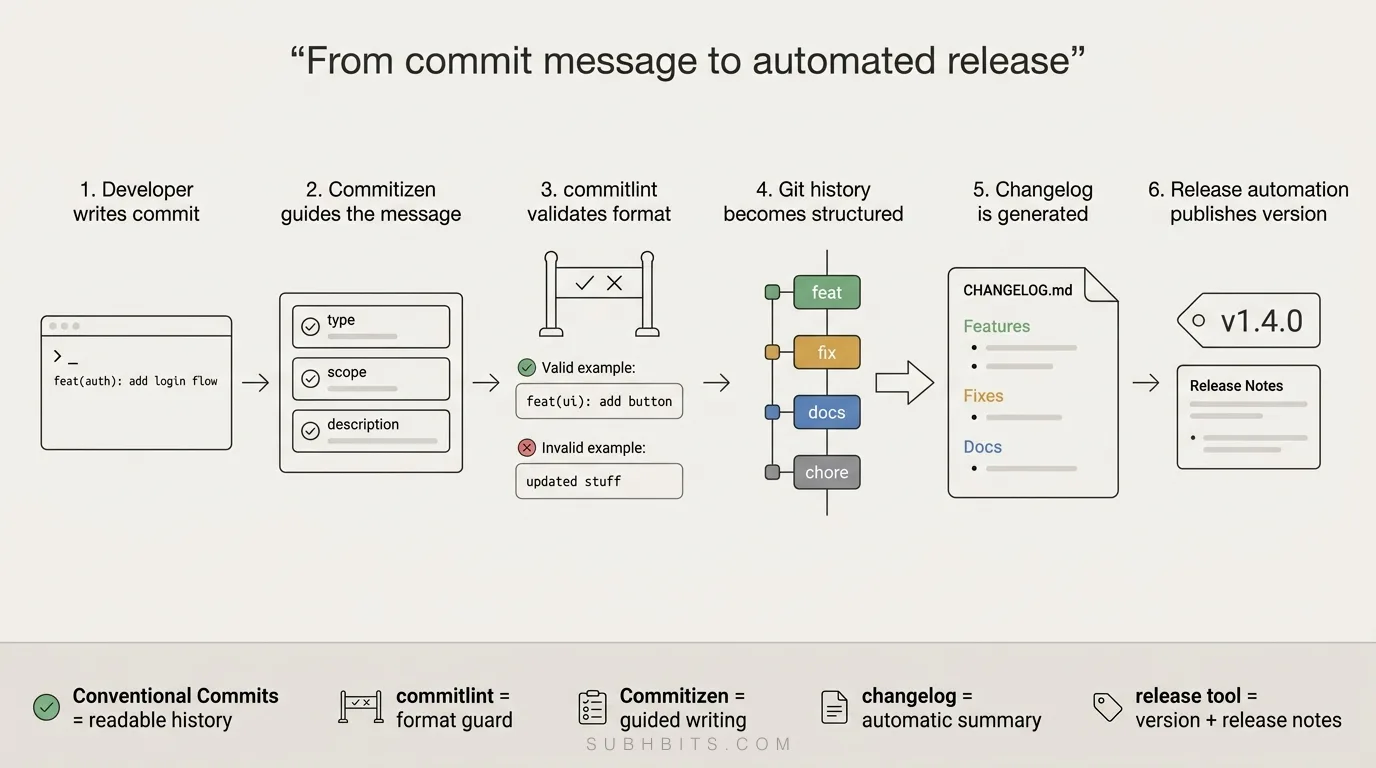
This blog post will explore setting up a robust system that leverages Conventional Commits, Changelog generation, and Release automation to streamline your development process.
Conventional Commits
Visit the official specification for more details.
Conventional Commits are a standardized way of writing commit messages that provide structure and consistency to your project's commit history.
It helps you create more readable and meaningful commit messages, which in turn improves the overall quality of your project's commit history.
The Conventional Commits specification outlines a set of rules for creating commit messages, including:
- A type field that describes the nature of the change (e.g.,
featfor a new feature,fixfor a bug fix) - A scope field that identifies the area of the codebase affected by the change (optional)
- A description field that briefly explains the change
- Additional fields for breaking changes and references to related issues or pull requests
Types of Commits
Conventional Commits defines several types of commits, each with its purpose and meaning. Here are the main types:
| Type | Description | Examples |
|---|---|---|
| feat | A new feature | feat: Add a new feature to the application |
| fix | A bug fix | fix: Fix a bug in the application |
| docs | Documentation changes | docs: Update the documentation |
| style | Changes that do not affect the meaning of the code | style: Update the code formatting |
| refactor | A code change that neither fixes a bug nor adds a feature | refactor: Refactor the code |
| perf | A performance improvement | perf: Improve the performance |
| test | Adding missing tests or correcting existing tests | test: Add missing tests |
| build | Changes that affect the build system or dependencies | build: Update the build process |
| ci | Changes to the CI configuration files | ci: Update the CI configuration |
| chore | Changes to auxiliary tools and libraries | chore: Update auxiliary tools |
Setting up Conventional Commits
npm install --save-dev @commitlint/cli @commitlint/config-conventionalCreate a commitlint.config.js file in your project root with the following
content:
module.exports = {
  extends: ["@commitlint/config-conventional"]
};
Install and initialize Husky, a tool that helps manage Git hooks:
npm install husky --save-dev
npx husky init
Create a .husky/commit-msg file with the following content:
#!/usr/bin/env sh
. "$(dirname -- "$0")/_/husky.sh"

npx --no -- commitlint --edit "$1"
Update your package.json file to include the prepare script:
"scripts": {
  "prepare": "husky"
}
Run the prepare script to ensure Husky is set up:
npm run prepareNow, the commitlint hook will validate your commit message against the Conventional Commits specification whenever you try to make a commit.
Commitizen
Commitizen is a tool that helps you write Conventional Commit messages. It provides a command-line interface that guides you through the process of creating a commit message, ensuring that it adheres to the Conventional Commits specification.
Using Commitizen can help you avoid common mistakes and ensure that your commit messages are consistent across your project.
When you run npm run commit using Commitizen, it typically provides an
interactive menu that looks something like this:
? Select the type of change that you're committing: (Use arrow keys)
❯ feat:     A new feature
  fix:      A bug fix
  docs:     Documentation only changes
  style:    Changes that do not affect the meaning of the code (white-space, formatting, missing semi-colons, etc)
  refactor: A code change that neither fixes a bug nor adds a feature
  perf:     A code change that improves performance
  test:     Adding missing tests or correcting existing tests
  build:    Changes that affect the build system or external dependencies (example scopes: gulp, broccoli, npm)
  ci:       Changes to our CI configuration files and scripts (example scopes: Travis, Circle, BrowserStack, SauceLabs)
  chore:    Other changes that don't modify src or test files
  revert:   Reverts a previous commit

? What is the scope of this change (e.g. component or file name): (press enter to skip)
? Write a short, imperative tense description of the change (max 94 chars):
? Provide a longer description of the change: (press enter to skip)
? Are there any breaking changes? (y/N)
? Does this change affect any open issues? (y/N)
Setting up Commitizen
-
Install the necessary dependencies:
npm install --save-dev cz-conventional-changelog -
Initialize Commitizen:
npx commitizen init cz-conventional-changelog --save-dev --save-exactThis will add the necessary configuration to your
package.jsonfile. -
Add a
commitscript to yourpackage.json:"scripts": { "prepare": "husky", "commit": "cz" }
Now, whenever you need to make a commit, you can runnpm run committo use the
Commitizen CLI, which will guide you through writing a Conventional Commit
message.
Generating a Changelog
To automatically generate a changelog based on your Conventional Commits, we'll use the release-it plugin:
-
Install the necessary dependencies:
npm install --save-dev @release-it/conventional-changelog release-it -
Create a
.release-it.jsonfile in your project root with the following configuration:{ "git": { "commitMessage": "chore: release v${version}" }, "github": { "release": true }, "npm": { "publish": false }, "plugins": { "@release-it/conventional-changelog": { "preset": "angular", "infile": "CHANGELOG.md" } } } -
Add a
releasescript to yourpackage.json:"scripts": { "prepare": "husky", "commit": "cz", "release": "release-it" }
Now, when you run npm run release, the tool will automatically generate a
changelog based on your Conventional Commits and create a new GitHub release.
Automating Releases
To further streamline your release process, you can use
thestandard-versiontool, which automates version bumping and changelog
generation:
-
Install the necessary dependencies:
npm install --save-dev standard-version -
Add a
releasescript to yourpackage.json:"scripts": { "release": "standard-version" } -
Run the release script:
npm run releaseThis will:
- Bump the version in your
package.jsonfile - Generate a changelog based on your Conventional Commits
- Commit the changes
- Create a new Git tag
- Bump the version in your
I have created an npm package called conventional-setup-cli that brings together Conventional Commits, Changelog generation, and Release automation for your projects! 🎉
By integrating Conventional Commits, Changelog generation, and Release automation into your Git workflow, you can significantly enhance the organization and efficiency of your development process.
These practices not only ensure that your commit history is clear and meaningful but also automate tedious tasks, allowing you to focus more on writing quality code.