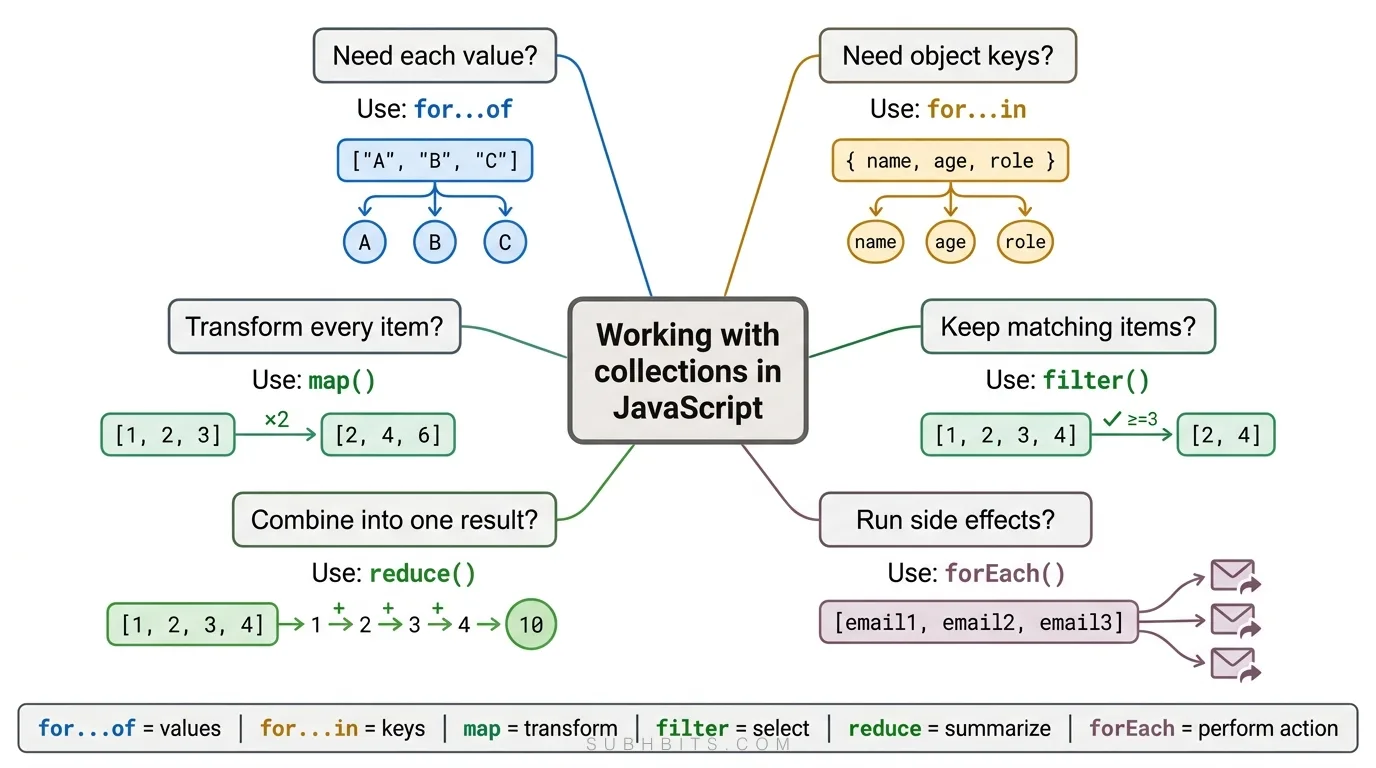
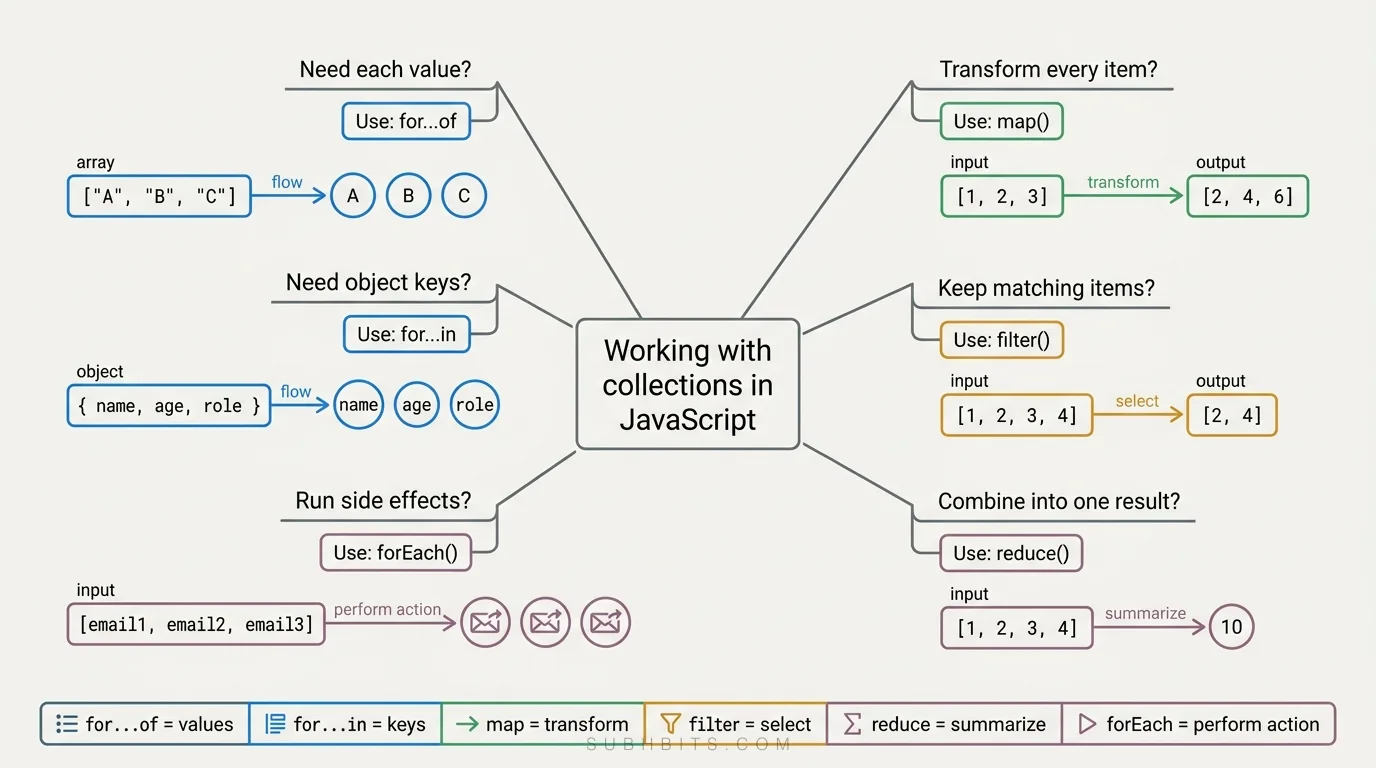
Master JavaScript higher-order array methods like map, filter, and reduce. Learn how these modern iteration patterns simplify code and improve readability.
If you're tired of writing repetitive code to iterate over arrays and objects, it’s time to discover the higher-order loops.
Higher-order loops provide an easy and powerful way to work with data collections, making your code clearer, shorter, and easier to maintain.
Unlike traditional loops, higher-order loops are methods that take a callback function and apply it to each element in a collection.
Yes, this is a defining feature of higher-order loops: they accept a function as an argument to process each element in a collection.
So Instead of using traditional for or while loops, we will use high-order loops use functions like map, filter, reduce, and others to handle looping in a more abstract and often more readable way.
Additionally, for...of and for...in loops provide a more straightforward syntax for iterating over values and properties without the need for a callback function.
For Of Loop
The for...of loop is a modern iteration statement in JavaScript that simplifies looping over iterable objects such as arrays, strings, maps, sets, and other objects that implement the iterable protocol. It allows you to traverse all the elements of an iterable without having to worry about the index or the length property.
The for...of loop is a modern iteration statement in JavaScript that simplifies looping over iterable objects such as arrays, strings, maps, sets, and other objects that implement the iterable protocol. It allows you to traverse all the elements of an iterable without having to worry about the index or the length property.
Syntax
for (variable of iterable) {
  // statement
}
variable: A variable that will be assigned the value of each iterated element.
iterable: An object that has iterable properties, like an array, string, set, map, etc.
The for...of loop is particularly useful when you need to iterate over all elements of an array, string, or any other iterable, without the need to access the index or perform specific operations based on the index.
Found a typo or a better way to explain something? Email me — I read them.
Keep reading
Iterating Over Different Data Types
Iterating Over an Array
const numbers = [1, 2, 3, 4, 5];
for (const number of numbers) {
  console.log(number);
}
// Output: 1 2 3 4 5
This code snippet creates an array called numbers containing the values 1, 2, 3, 4, and 5. It then uses a for...of loop to iterate over each element in the numbers array. During each iteration, the current element is assigned to the variablenumber, and then the console.log() function is used to output the value of number to the console. This loop will output each number in the numbers array on a separate line.
Iterating Over a String
for (const char of message) {
  console.log(char);
}
// Output: H e l l o
Iterating Over a Map
Maps are collections of key-value pairs where each key is unique. When iterating over a map, you use the for...of loop along with destructuring to access each key-value pair.
Unique Keys: Each key in a map must be unique. Adding a key that already exists will overwrite the previous value.
Maintained Order: Maps maintain the insertion order of the key-value pairs. The first element inserted will be the first one iterated over, and so on.
Iterating Over a Set
A Set in JavaScript is a collection of unique values. It can hold any type of values, whether primitive or object references.
Characteristics of a Set:
Unique Values: Each value must be unique; duplicates are not allowed.
Order of Insertion: Maintains the order of element insertion.
Iterable: Sets are iterable, allowing you to use loops such as for...of.
const uniqueNumbers = new Set([1, 2, 3, 4, 5]);
for (const number of uniqueNumbers) {
  console.log(number);
}
// Output: 1 2 3 4 5
Using for...of with the arguments Object
The arguments object is an array-like object accessible inside functions that contain the values of the arguments passed to that function.
Note that it is not a real array, so array methods like forEach or map cannot be directly used on it without converting it to a real array first. Each argument can be accessed using a zero-based index.
function sum() {
  let total = 0;
  for (const num of arguments) {
    total += num;
  }
  return total;
}

console.log(sum(1, 2, 3, 4)); // Output: 10
This code snippet defines a function called sum that calculates the total sum of all the arguments passed to it. It uses a for...of loop to iterate over the arguments object, which contains all the arguments passed to the sum function.
Since the sum function definition does not specify a fixed number of parameters,it can accept a variable number of arguments and it uses the arguments object to access all the arguments passed to the function.
The for...of loop then iterates over these arguments, allowing the function to handle any number of arguments provided when it is called.
Using for...of to iterate on Object
The for...of loop is not directly applicable to plain objects because they are not iterable by default. However, you can still iterate over the properties of an object using alternative methods, such as Object.keys(), Object.values(), or Object.entries(), combined with the for...of loop.
Iterating Over Object Properties Using for...of
UsingObject.keys(): Iterates over the keys of the object.
UsingObject.values(): Iterates over the values of the object.
UsingObject.entries(): Iterates over the key-value pairs of the object.
Examples
Iterating Over Keys
const user = {
  name: "John",
  age: 30,
  profession: "Developer",
};

for (const key of Object.keys(user)) {
  console.log(key);
}

// Output:
// name
// age
// profession
Iterating Over Values
const user = {
  name: "John",
  age: 30,
  profession: "Developer",
};

for (const value of Object.values(user)) {
  console.log(value);
}

// Output:
// John
// 30
// Developer
Iterating Over Entries
const user = {
  name: "John",
  age: 30,
  profession: "Developer",
};

for (const [key, value] of Object.entries(user)) {
  console.log(`${key}: ${value}`);
}

// Output:
// name: John
// age: 30
// profession: Developer
For IN Loop
The for...in loop in JavaScript is used to iterate over the enumerable properties of an object. This includes properties that are inherited through the prototype chain unless those properties are non-enumerable.
variable: A variable that will be assigned the key (property name) of each iterated property.
object: The object whose enumerable properties are iterated over.
The for...in loop is particularly useful for iterating over the properties of an object, allowing you to access both the property names (keys) and their values.
Best Practices
Object Check: Ensure you are iterating over objects and not arrays, as for...in is not meant for array iteration (use for...of or array methods like forEach for arrays).
Own Properties Check: Use hasOwnProperty to filter out properties inherited through the prototype chain if needed.
The for...in loop is particularly useful for iterating over the properties of an object, allowing you to access both the property names (keys) and their values.
Avoid with Arrays: Avoid using for...in with arrays due to potential issues with non-integer keys and inherited properties.
Examples
Let's create a plain object representing a car and use the for...in loop to iterate over its properties:
Iterating over object properties refers to examining each key-value pair in a JavaScript object. This is commonly done using the for...in loop, which iterates over all enumerable properties of an object, including those inherited through the prototype chain. To restrict iteration to an object's own properties, the hasOwnProperty method is used.
const user = {
  name: "John",
  age: 30,
  profession: "Developer",
};

for (const key in user) {
  if (user.hasOwnProperty(key)) {
    // Ensuring it's an own property
    console.log(`${key}: ${user[key]}`);
  }
}

// Output:
name: John;
age: 30;
profession: Developer;
Iterating Over Inherited Properties:
When you iterate over inherited properties, you are accessing properties that are not defined directly on the object but are inherited from its prototype. This can be done using the for...in loop. To demonstrate:
function Person(name, age) {
  this.name = name;
  this.age = age;
}

Person.prototype.profession = "Developer";
const john = new Person("John", 30);
for (const key in john) {
  console.log(`${key}: ${john[key]}`);
}
// Output:
name: John;
age: 30;
profession: Developer;
Using for...in with Arrays (Not Recommended):
Arrays in JavaScript are best iterated using other methods, such as for...of, forEach(), or traditional for loops, as these provide more predictable outcomes and do not include prototype properties in the iteration. For example:
const numbers = [1, 2, 3, 4, 5];

for (const index in numbers) {
  console.log(index);
}
// Output:
// 0
// 1
// 2
// 3
// 4
If you want to print both the indices and the values, you can combine the for...in loop with the array access:
The for...in loop is not suitable for iterating over Maps in JavaScript. Instead, you should use the for...of loop to iterate over Maps. However, if you want to iterate over the keys, values, or entries of a Map, you can use the Map's built-in methods: keys(), values(), and entries(), combined with the for...of loop.
Iterating Over Keys:
const userRoles = new Map();
userRoles.set("John", "Admin");
userRoles.set("Jane", "Editor");
userRoles.set("Doe", "Viewer");

for (const key of userRoles.keys()) {
  console.log(key);
}

// Output:
// John
// Jane
// Doe
Iterating Over Values:
const userRoles = new Map();
userRoles.set("John", "Admin");
userRoles.set("Jane", "Editor");
userRoles.set("Doe", "Viewer");

for (const value of userRoles.values()) {
  console.log(value);
}

// Output:
// Admin
// Editor
The forEach loop is a method available on arrays and other iterable collections (like Maps and Sets) in JavaScript. It allows you to execute a provided function once for each array element.
The forEach method requires a callback function that will be executed once for each element in the array. This callback function can take up to three arguments:
element: The current element being processed in the array.
index (optional): The index of the current element being processed in the array.
array (optional): The array that forEach was called upon.
The forEach method is particularly useful when you need to perform a specific action for each element in an array, such as logging values, updating elements, or performing calculations.
Basic Iteration Over an Array:
const numbers = [1, 2, 3, 4, 5];
/* you can write this also
numbers.forEach(function (item) {})
*/
numbers.forEach((number) => {
  console.log(number);
});

// Output:
// 1
// 2
// 3
// 4
// 5
Passing functions to the forEach method is a common practice in JavaScript. You can pass both named and anonymous functions as the callback function for forEach. Here's how you can do it with various examples:
Using Anonymous Functions
You can pass an anonymous function directly to the forEach method.
When using forEach, keep the following best practices in mind:
Side Effects: Use forEach for performing actions that produce side effects, like modifying elements, logging, or updating the DOM.
Avoid Returns: forEach is not designed for returning values or constructing new arrays. Use map, filter, or reduce for these purposes.
Arrow Functions: Use arrow functions for concise syntax, especially for simple operations.
Conclusion
Passing functions to the forEach loop provides flexibility and reusability in your code. You can use anonymous functions, arrow functions, named functions, and even higher-order functions to achieve different behaviors during iteration. This makes the forEach method a powerful tool for performing operations on arrays and other iterable collections.
Differences Between forEach and Other Loops
NoEarly Exit: Unlike for, for...of, or for...in loops, the forEach method cannot be broken out of using break or return. It will iterate over all elements unless an exception is thrown.
NoReturn Value: The forEach method always returns undefined. It is designed to perform side effects rather than to transform data.
Simplicity: forEach provides a simple and readable way to iterate over arrays and collections, especially when you don’t need to construct new arrays or handle return values.
Working with Array of Objects
When you have an array of objects, you can use the forEach method (or other iteration methods) to iterate over each object in the array and perform operations on its properties. Here are various ways to iterate over an array of objects:
The for...of loop is another way to iterate over an array of objects.
for (const user of users) {
console.log(Name: ${user.name}, Age: ${user.age});
}

// Output:
// Name: John, Age: 30
// Name: Jane, Age: 25
// Name: Doe, Age: 22
Using for Loop
You can also use the traditional for loop.
for (let i = 0; i < users.length; i++) {
 console.log(`Name: ${users[i].name}, Age: ${users[i].age}`);
}

// Output:
// Name: John, Age: 30
// Name: Jane, Age: 25
// Name: Doe, Age: 22
Using reduce Method
The reduce method can be used to accumulate values based on the objects in the array.