Understanding Shallow vs Deep Copying in JavaScript
Discover how higher-order loops in JavaScript can simplify your code and make it more maintainable. Learn about map, filter, reduce and other modern iteration methods.
What happens when copying objects directly using assignemnt operator
When working with objects and arrays in JavaScript, it's important to understand the difference between shallow and deep copying. Incorrect copying can lead to unintended mutation of data. Let's dive in and clarify these concepts!
Shallow Copying
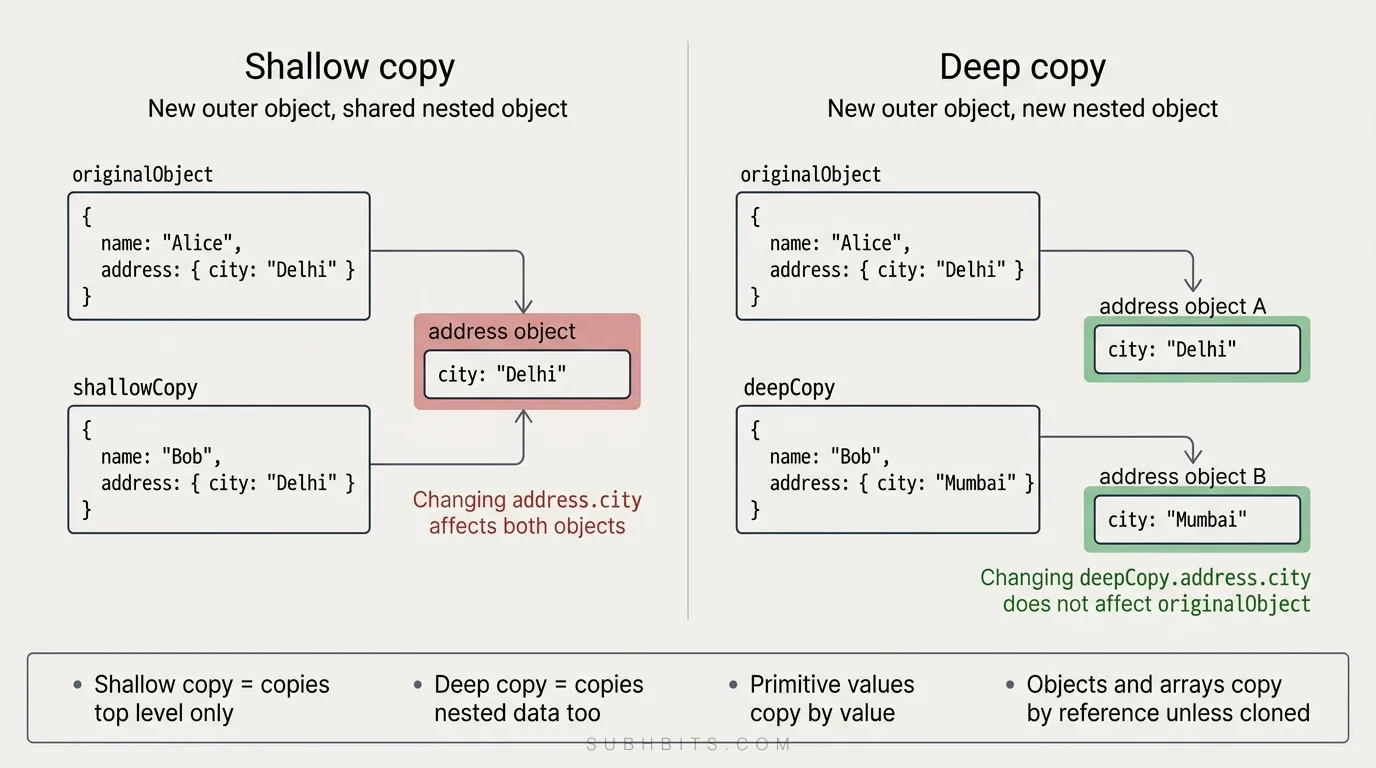
A shallow copy creates a new object or array, but the elements or properties reference the same memory locations as the original. Modifying a shallow copy can change the original.
Shallow Copying Objects
In this example, shallowCopy is a shallow copy of originalObject. When we modify the city property of the address object in shallowCopy, it also changes in originalObject because both objects share the same reference to the address object.
Here's what's happening:
We create a shallow copy of originalObject using the spread operator.
We modify the name, city and zip properties of the original object in shallowCopy.
If you change a primitive property (like a string, number, or boolean) in the shallow copy, it will not affect the original object. This is because primitive values are copied by value. So, changin name to Bob will not change the original object.
Both originalObject.address.city and shallowCopy.address.city output "Delhi" because they reference the same address object in memory.
Similarly, both originalObject.address.zip and shallowCopy.address.zip output "110001".
When we log the entire originalObject and shallowCopy, we see that they are identical. The shallow copy only created a new top-level object, but the nested address object is still the same reference for both.
Shallow copying of an object (using the spread operator above) copies the first-level properties, but nested objects still reference the original memory.
Found a typo or a better way to explain something? Email me — I read them.
Keep reading
Deep Copying
A deep copy recursively creates a completely independent clone of the original object or array and all nested objects or elements. Modifying a deep copy does not affect the original.
Deep Copying of Objects
Using JSON.parse(JSON.stringify()) is a quick way to deep copy an object. The original object is unaffected when modifying the deep copy.
Similarly, JSON.parse(JSON.stringify()) can deep copy arrays. Modifying the deep copy doesn't affect the original array.
JSON stringify does not work when functions or dates are used .
Methods for Shallow Copying
There are several ways to create a shallow copy of an object or array in JavaScript. Let's explore each method in detail.
The spread syntax ... is a concise way to shallow copy an object. It creates a new object with the same properties as the original, but the first-level properties are copied by value.
Object.assign() copies the values of all enumerable properties from one or more source objects to a target object. It returns the modified target object, effectively creating a shallow copy.
3. Custom function
function shallowObjCopy(obj) {
  const newObj = {};
  for (let prop in obj) {
    if (obj.hasOwnProperty(prop)) {
      newObj[prop] = obj[prop];
    }
  }
  return newObj;
}

const originalObj = { a: 1, b: { c: 2 } };
const shallowObj = shallowObjCopy(originalObj);
You can create a custom function to iterate over the properties of an object and copy them to a new object. This gives you more control over the copying process.
Similar to objects, the spread syntax ... can be used to shallow copy an array. It creates a new array with the same elements as the original, but only the first level elements are copied by value.
Array.prototype.slice() returns a shallow copy of a portion of an array into a new array object. When called without arguments, it creates a shallow copy of the entire array.
Array.from() creates a new, shallow-copied array instance from an array-like or iterable object. It can be used to create a shallow copy of an existing array.
4. Custom function
function shallowArrCopy(arr) {
  const newArr = [];
  for (let i = 0; i < arr.length; i++) {
    newArr.push(arr[i]);
  }
  return newArr;
}

const originalArr = [1, [2, 3]];
const shallowArr = shallowArrCopy(originalArr);
Similar to objects, you can create a custom function to iterate over the elements of an array and copy them to a new array, providing more control over the copying process.
Remember, regardless of the method, a shallow copy only copies the first-level elements or properties. Nested objects or arrays still reference the same memory as the original.
Limitations of Object.assign()
While Object.assign() is a useful method for shallow copying objects, it has some limitations that you should be aware of:
1. Primitive values and nested objects
If a property holds a primitive value, Object.assign() copies the value to the target object. However, if a property is a reference to an object, Object.assign() only copies that reference, resulting in a shallow copy.
In this example, modifying shallowObj.a doesn't affect originalObj.a because a holds a primitive value. However, modifying shallowObj.b.c affects originalObj.b.c because b references a nested object.
2. Enumerable properties only
Object.assign() only copies enumerable properties from the source objects to the target object. It ignores non-enumerable properties and properties inherited from the prototype chain.
In this example, the non-enumerable property b is not copied to shallowObj.
3. Accessor properties
If the source object has getter or setter functions, Object.assign() copies the descriptor of the accessor property to the target object, not the value itself.
To avoid this error, ensure that all source objects are valid and non-null.
Understanding these limitations will help you decide when Object.assign() is appropriate for your use case and when you might need to consider alternative copying methods or deep cloning techniques.
Methods for creating deep copies
JSON parse/stringify method:
let deepCopy = JSON.parse(JSON.stringify(originalObject));
Lodash library's cloneDeep function:
const _ = require("lodash");
let deepCopy = _.cloneDeep(originalObject);
Structured Clone API (available in modern browsers and Node.js):
let deepCopy = structuredClone(originalObject);
Custom recursive function:
function deepCopy(obj) {
  if (typeof obj !== "object" || obj === null) return obj;
  let copy = Array.isArray(obj) ? [] : {};
  for (let key in obj) {
    if (Object.prototype.hasOwnProperty.call(obj, key)) {
      copy[key] = deepCopy(obj[key]);
    }
  }
  return copy;
}
Libraries like rfdc (Really Fast Deep Clone):
const clone = require("rfdc")();
let deepCopy = clone(originalObject);
Additional Concepts
1. Spread syntax with object literals
The spread syntax (...) can be used to merge objects or override properties when creating a new object literal.
In this example, the properties of obj1 and obj2 are merged into a new object, with obj2 properties overriding those of obj1.
2. Object.create() and prototype inheritance
Object.create() creates a new object with the specified prototype object and properties. It can be used to create a shallow copy of an object with a different prototype.
In this example, newObj is created with prototypeObj as its prototype, inheriting the property a.
3. JSON.stringify() replacer function
When using JSON.stringify() for deep copying, you can provide a replacer function to control the serialization process. The replacer function allows you to filter or modify the object's properties before serialization.
In this example, the replacer function excludes the property b from the serialized object, resulting in a deep copy without that property.
4. Recursive deep copying function
For more complex deep copying scenarios, you can create a recursive function that handles different data types and edge cases.
function deepCopy(obj) {
  if (typeof obj !== "object" || obj === null) {
    return obj;
  }

  const copy = Array.isArray(obj) ? [] : {};

  for (let key in obj) {
    if (Object.hasOwnProperty.call(obj, key)) {
      copy[key] = deepCopy(obj[key]);
    }
  }

  return copy;
}
This recursive deepCopy function handles arrays, objects, and primitive types, creating a deep copy of the input object.
5. Immutable.js library
Immutable.js is a JavaScript library that provides immutable data structures. It ensures that modifications to objects or arrays always return new instances, preserving the original data.
In this example, newMap is created by modifying the a property of originalMap, but originalMap remains unchanged.
These additional concepts should provide a more comprehensive understanding of copying and manipulating objects and arrays in JavaScript. They cover advanced techniques, libraries, and important nuances to consider when working with data structures.
Some Examples and use cases
State Management in React or Vue When working with state management libraries like Redux (for React) or Vuex (for Vue), it's crucial to ensure that state updates are immutable.
This means that instead of directly modifying the state object, you should create a new copy of the state with the desired changes.
Shallow copying can be used for simple state updates, but if the state contains nested objects or arrays, you need to perform a deep copy to ensure immutability and prevent unintended side effects.
Example:
// Redux reducer
function todoReducer(state = initialState, action) {
  switch (action.type) {
    case "ADD_TODO":
      // Create a new array with the existing todos and the new todo
      return {
        ...state,
        todos: [...state.todos, action.payload],
      };
    case "UPDATE_TODO":
      // Create a new array with updated todo object
      return {
        ...state,
        todos: state.todos.map((todo) =>
          todo.id === action.payload.id
            ? { ...todo, ...action.payload }
            : todo
        ),
      };
    default:
      return state;
  }
}
Cloning Objects for Editing In web applications that allow users to edit data, you often need to create a copy of the original object for editing purposes.
This ensures that the original data remains unchanged until the user confirms the changes.
Shallow copying can be used if the object contains only primitive values, but if the object has nested objects or arrays, deep copying is necessary to create a completely independent copy for editing.
Example:
// Cloning an object for editing
const originalUser = {
  id: 1,
  name: "John Doe",
  address: {
    street: "123 Main St",
    city: "New York",
  },
};

const editedUser = JSON.parse(JSON.stringify(originalUser));
editedUser.name = "John Smith";
editedUser.address.city = "Los Angeles";

// Original user object remains unchanged
console.log(originalUser);
// { id: 1, name: 'John Doe', address: { street: '123 Main St', city: 'New York' } }
Undo/Redo Functionality Implementing undo/redo functionality in a web application often requires keeping track of the state history.
Each time a user performs an action, you need to store a copy of the current state in the history array.
When the user triggers an undo or redo operation, you can retrieve the appropriate state from the history array.
Deep copying is necessary to ensure that each stored state is independent and not affected by subsequent modifications.
Example:
// Undo/Redo functionality
let history = [];
let currentState = {
  /* initial state */
};

function updateState(newState) {
  history.push(JSON.parse(JSON.stringify(currentState)));
  currentState = newState;
}

function undo() {
  if (history.length > 0) {
    currentState = history.pop();
  }
}

// Perform state updates
updateState(/* modified state */);
updateState(/* further modified state */);

// Undo the last state update
undo();
These are just a few examples of real-world use cases where shallow copying and deep copying come into play when building web applications. Understanding when to use shallow copying versus deep copying is important for maintaining data integrity, preventing unexpected side effects,
Edge Cases and Limitations
Functions, Dates, undefined, Infinity, RegExps, Maps, Sets, Blobs, FileLists, ImageDatas, and other complex types cannot be deep copied with JSON.parse(JSON.stringify()). It's best to use a library like Lodash's _.cloneDeep() to handle these cases.
Circular references (an object that references itself) cannot be deep copied with JSON.parse(JSON.stringify()) and will throw an error. Specialized libraries are needed.
Shallow copying an array can also be done with Array.prototype.slice() like const shallowArr = originalArr.slice().
Shallow copying an object can also be done with Object.assign() like const shallowObj = Object.assign({}, originalObj).
Key Points to Remember
Shallow copying only copies the first level, deep copying copies all levels recursively.
Modifying a shallow copy can affect the original for nested objects/arrays.
JSON.parse(JSON.stringify()) can deep copy objects/arrays but has limitations.
For complex types or circular references, use a library like Lodash.
Understanding these distinctions is crucial for correctly copying and modifying data structures in JavaScript. In an interview, be ready to describe the differences, provide examples, and discuss the edge cases and limitations of each approach. Practice these concepts to confidently handle data copying scenarios in your JavaScript projects!